OpenTool Docs
No fluff. No "getting started in 47 easy steps." Just the stuff you actually need to wire your agent to real tools.
Overview
You're building an agent. It needs to create GitHub issues, send Slack messages, read Notion pages. So now you're writing OAuth flows, managing token refresh, handling encrypted storage — congratulations, you're no longer building an agent. You're maintaining plumbing.
OpenTool kills that entire layer. One MCP server. Every tool your agent needs. Authenticated, encrypted, audited. You write zero auth code.
If you're writing OAuth code for the third time, something is broken. This fixes it.
Self-hosted
Your tokens, your server. Nothing leaves your infra. Nothing phones home.
MIT Licensed
Fork it, gut it, rebuild it, sell it. Zero restrictions. We don't care.
MCP Native
Claude Code, Cursor, Windsurf — anything that speaks MCP. One config, done.
The Story
This started the way most side projects do — sitting around, looking for something new to build, something worth learning from.
Found Arcade.dev. A tool execution layer for AI agents with managed auth. Dug into it for hours — how it handled OAuth brokering, how tools got registered and discovered, how the execution pipeline worked, how it managed token lifecycle and credential storage. The more I understood it, the more I thought: this is a genuinely good idea, but it's closed-source, hosted, and not something you can own or inspect.
Spent hours in front of Claude going back and forth — breaking the architecture down, figuring out what each layer actually does vs. what's just marketing, designing how an open-source version could work. Then sketched the whole system out:
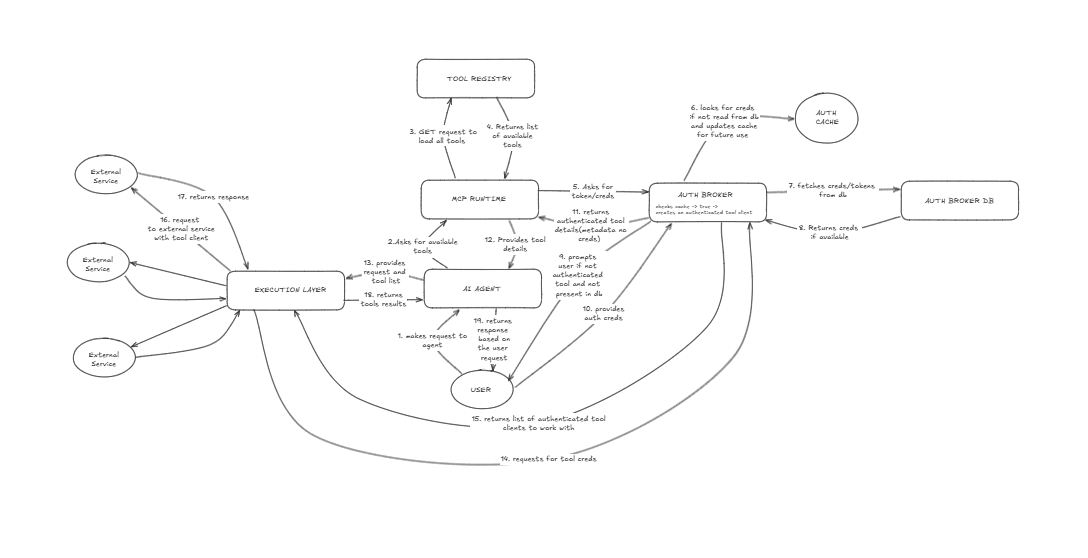
The original sketch. Hours of research distilled into one diagram. This is what the entire project was built from.
Then added my own quirks. Encrypted token storage with AES-256-GCM instead of plain-text. A full interactive CLI because I live in the terminal. A dashboard that doesn't suck. Audit logging on every tool execution. Docker Compose so anyone can self-host in 30 seconds.
The core thesis was simple: this should be open-source. Your agent's tool access shouldn't depend on someone else's uptime, someone else's pricing page, someone else's roadmap. If the execution layer is this critical, you should be able to read every line of it.
So that's what this is. Not a startup. Not a pitch deck. Just a tool that exists because someone needed it to exist.
Self-hosting
Your tokens should not live in some SaaS dashboard you can't audit. OpenTool runs on your machine. Your tokens stay with you. Everything is inspectable. One command to start.
# Clone the repo
git clone https://github.com/Aditya251610/opentool.git
cd opentool

# Copy the env file and fill in your values
cp .env.example .env

# Start everything
docker compose up -d
That spins up four containers. The whole stack:
- → PostgreSQL database
- → Redis for token caching
- → OpenTool server (port 3001)
- → Dashboard (port 3000)
Migrations run on first boot. Schema, seed data, everything. You don't touch SQL. It just works.
Without Docker
Don't like Docker? Fine. Bring your own Postgres and run it bare:
# Install dependencies
pnpm install

# Set up the database
cd apps/server
npx prisma generate && npx prisma db push
npx tsx prisma/seed.ts

# Start the server + dashboard
cd ../..
pnpm dev
Configuration
One .env file. That's the entire config surface. No YAML nesting hell, no scattered config files across four directories, no "check the wiki for advanced options."
Required
# Database — any PostgreSQL instance
DATABASE_URL="postgresql://user:pass@localhost:5432/opentool"
DIRECT_URL="postgresql://user:pass@localhost:5432/opentool"

# Encryption key for stored tokens (generate with: openssl rand -hex 32)
TOKEN_ENCRYPTION_KEY="your-64-char-hex-key"

# Server URL (used for OAuth callbacks)
SERVER_URL="http://localhost:3001"
DASHBOARD_URL="http://localhost:3000"
OAuth Providers
Add credentials for providers you actually use. No credentials = provider doesn't exist. You don't configure what you don't need. Simple.
# GitHub
GITHUB_CLIENT_ID=""
GITHUB_CLIENT_SECRET=""

# Notion
NOTION_CLIENT_ID=""
NOTION_CLIENT_SECRET=""

# Slack
SLACK_CLIENT_ID=""
SLACK_CLIENT_SECRET=""

# Google (Gmail + Calendar)
GOOGLE_CLIENT_ID=""
GOOGLE_CLIENT_SECRET=""

# Linear, Vercel — same pattern
# Resend and PostgreSQL use API keys (no OAuth needed)
Dashboard
localhost:3000. Four pages. No settings buried in settings. No dashboard that needs a dashboard to manage it.
- Overview — Stats, MCP config snippet, server health. The stuff you actually check.
- Tools — Connect/disconnect providers. One click, OAuth does the rest.
- API Keys — Create, copy, revoke. No key rotation ceremony.
- Settings — Profile. That's it. Not 47 tabs.
Connect a tool from the CLI? Shows up in the dashboard. Connect from the dashboard? Works in the CLI. Same database, same state. Because syncing tools across interfaces shouldn't be a feature — it should be the default.
CLI
Not everyone wants to context-switch to a browser to connect a tool. The CLI is a full interactive TUI — login, connect providers, check status, execute tools. All from your terminal. OAuth links are Ctrl+Click-able. You never leave your workflow.
# Run the CLI
npx opentool-cli

# Or install globally
npm i -g opentool-cli
opentool

# Or from the monorepo
cd packages/cli && pnpm dev
Commands
login <email> <pass>Log in and save API key locallyloginOpens browser for dashboard loginset-key <key>Manually set an API key from dashboardconnect <provider>Open OAuth flow for a provider (Ctrl+Click the URL)disconnect <provider>Remove a tool connectiontoolsList all providers and connection statusexecute <tool> {args}Execute a tool (e.g. execute github.list_issues)keysList your API keysstatusCheck server connection healthMCP Setup
This is the part that actually matters. Most people have 5+ MCP servers in their config — scattered, duplicated, half-broken. OpenTool replaces all of them. One entry. Every tool.
Claude Desktop
{
  "mcpServers": {
    "opentool": {
      "url": "http://localhost:3001/mcp",
      "headers": {
        "Authorization": "Bearer ot_your_api_key_here"
      }
    }
  }
}
Claude Code
# Add OpenTool as an MCP server
claude mcp add opentool \
  --url http://localhost:3001/mcp
Cursor
// .cursor/mcp.json
{
  "mcpServers": {
    "opentool": {
      "url": "http://localhost:3001/mcp",
      "headers": {
        "Authorization": "Bearer ot_your_api_key_here"
      }
    }
  }
}
Once configured, your agent sees every connected tool. Connect a new provider in the dashboard or CLI → agent picks it up instantly. No config edit. No restart. No "please reload your MCP servers."
If your MCP setup needs a spreadsheet to track what's connected where, you don't have a system. You have chaos.
Tool Reference
120 tools. 24 providers. These aren't wrappers around wrappers — they're direct API calls with proper auth. You can read every line of execution code. Nothing is abstracted away into some plugin system you can't debug.
GitHub
OAuth2Notion
OAuth2Slack
OAuth2Linear
OAuth2Gmail
OAuth2Google Calendar
OAuth2Vercel
OAuth2Resend
API KeyPostgreSQL
API KeyAdding Tools
Most tool frameworks want you to learn their DSL, their config format, their plugin lifecycle. OpenTool doesn't have any of that. A tool is a single TypeScript file. Zod schema in, execute function out. That's the entire API.
// apps/server/tools/my-tool/index.ts
import { defineTool } from '@opentool/tool-schema'
import { z } from 'zod'

export const myTool = defineTool({
  id: 'mytool.do_thing',
  name: 'Do a thing',
  description: 'Does the thing you need done',
  provider: 'mytool',
  authType: 'oauth2',
  inputSchema: z.object({
    message: z.string().describe('The thing to do'),
  }),
  async execute({ input, auth }) {
    const res = await fetch('https://api.mytool.com/do', {
      method: 'POST',
      headers: {
        Authorization: `Bearer ${auth.accessToken}`,
        'Content-Type': 'application/json',
      },
      body: JSON.stringify({ message: input.message }),
    })
    return res.json()
  },
})
Import it in the registry, run the seed script. Your agent can use it immediately. No build step. No plugin manifest. No restart dance.
OAuth provider? Add client ID + secret to the seed script. API key only? Set authType: 'api_key'. Done. If adding a tool takes more than 10 minutes, something is wrong with the framework, not you.
Contributing
This isn't a corporation asking for free labor. It's a tool that exists because someone got tired of rewriting the same integrations. If you've felt that pain, you already understand the project.
Highest-impact contributions:
- 1. Add a new tool provider — see Adding Tools above. Most providers take under an hour.
- 2. Fix a bug — check open issues. Some are one-liners.
- 3. Improve these docs — you're reading them right now. You know what's confusing.
Half the ecosystem is glue code with branding. If you think a tool should exist, don't file an issue asking for it. Build it. Open a PR. That's how this project grows.
Changelog
CLI + SDK on npm, production hardening
First public release
This is not a demo project. This is the layer agents should have had from the start.